

The Exploratory Video Signal
Through extensive testing across six distinct video projects – ranging from educational reimagining (Odysseus retelling) to product demonstrations (NourishIQ patent visualization) to character-driven narratives (CopyKid learning moments) – clear patterns have emerged. Some content types align perfectly with AI generation capabilities for production-quality results with minimal post-editing. Others reveal persistent limitations that signal when alternative approaches or hybrid workflows make more sense. Near the end of this article, we disclose the high-level workflow used to create these videos, simplified from a collection of prompts.
The generative video revolution promised in our previous Signal (“Video Generation: Your New Creative Superpower“) continues to mature rapidly. Only two of many generative video models, Google’s Veo 3.1 and open-source alternatives like Wan 2.1 now offer unprecedented capabilities: frame-to-frame consistency options, dual-frame anchoring (input + output frames), and improved handling of complex scenes. If these models are the current basis for creating exploratory generative content, a critical question emerges: which content types actually benefit from current generative video capabilities?
This Signal synthesizes lessons from targeted video generation experiments, offering a practical framework for evaluating whether your own content concept aligns with current capabilities and providing tested techniques for maximizing success when it does. Just want the takeaways? Head to the bottom of the post for this Signal’s Generative Video Success Blueprint.
Context Matters: Exploring Wisely
For Creators (Explorers, Educators, Marketers)
This post and its parent were created to encourage experimentation with video for exploratory works in novel idea illustration and demonstration. However, understanding these capability boundaries prevents wasted effort and budget even for in-house efforts. The difference between a two-hour production workflow and days of frustrating post-editing often comes down to choosing content that aligns with current model strengths. Make no mistake, these tools still offer immediate skill and resource short cuts for content creation. A study around video production for educators cite these as one of the biggest pain points: “the practical limitations of many production activities preclude their being offered to most elementary- and secondary-school students […] often requires more equipment, classroom time, personnel, and teacher training than is available in many schools“.
- Immediate Applications:
- Product concept videos for stakeholder presentations
- Educational content for training programs
- Early-stage marketing tests before committing to full production
- Patent and technical concept visualizations for investor pitches
- When to Look Elsewhere:
- Precise technical documentation requiring exact steps
- Branded campaigns with specific logo/product placements
- Character-driven narratives requiring consistent animation across extended sequences
- Content featuring children as primary interactive characters
For Business Decision-Makers
These patterns reveal where AI video generation delivers immediate ROI versus where traditional production or hybrid approaches remain more efficient. The NourishIQ and BleepBloop projects demonstrated that technical concepts previously requiring $10k+ agency engagements can now be prototyped internally for the cost of API credits and a few hours of structured prompting.
However, attempts to replace precision technical documentation or branded campaigns with full AI generation still face significant hurdles. The smart approach: use generative video for concept validation and stakeholder alignment, then transition to traditional production for final, brand-critical deliverables when precision matters.
What’s Happening
Emergent Ideal Use Cases
Generative video is proving exceptionally capable for three primary content categories.
Product Demonstrations & Patent Visualizations: Abstract concepts translated into visual scenarios excel here. Projects like NourishIQ (IoT-connected plates visualization) and BleepBloop Medical (automated pharmacy workflows) demonstrate how fictional technologies can be realized in realistic settings with minimal effort. The models handle professional environments, complex split-screens, and concept-to-visual translation remarkably well. For businesses that previously required expensive agency work to visualize technical concepts or patent applications, this represents an immediate ROI opportunity.
Educational & Historical Content: The Odysseus House project showcases generative video’s strength in educational storytelling: reusable character stills maintained consistency across scenes, systematic generation workflows produced coherent narratives, and direct-to-camera formats (like mythological characters addressing the audience) worked reliably. Non-human sounds and the ability to switch accents and deliver context-appropriate dialogue opened possibilities for diverse storytelling approaches.
Original Concept Exploration: When freed from copyright constraints and precise technical requirements, the technology shines at bringing novel ideas to life quickly for early-stage validation, A/B testing, or initial client presentations. Multiple projects demonstrated that generative video serves as an excellent bridge between technical descriptions and market-ready visualizations.
The Persistent Challenges
Specific limitations continue to constrain certain content types:
Copyright & Brand Content – The Meme That Binds project encountered repeated moderation rejections when attempting to use iconic meme imagery or well-known brand elements. As more copyright holders opt out or require licensing (OpenAI avatars face similar constraints), this barrier will likely grow.
Children-Centric Content – CopyKid revealed audio generation failures when children were primary characters, plus moderation sensitivity around depicting minors in various scenarios.
Frame-to-Frame and Cross-Clip Character Consistency – Cat Super Prowler demonstrated marked degradation when attempting continuous character animation without anchor frames, with personified range of motion on the cat character proving particularly problematic.
Technical Precision – Process documentation requiring exact procedural steps frequently suffers from hallucinations and accuracy issues. In general, best results for this content type will be AI platforms that are created for instructional asset creation. For education, a comprehensive literature review found that “Visual and audio features, such as image and audio quality, mattered to the learners and caused positive effects on the learning outcome” and “Learners stated that video tutorials were more interesting, and attractive, kept them engaged, and helped them understand better”.
While the AI tools showcased here can help with high visual or audio quality in content, the grounding to subject matter and specific documents was poor. Consequently, no video is showcased here as a successful demonstration of generative video for highly technical documentation or illustration.
Evaluating Your Content: The Suitability Matrix
To help navigate these capabilities and constraints, testing revealed clear patterns across different content requirements. We subjectively grade for character coherence, precision for visual targets, impacts of specific brand or IP inclusion, visualization of rich human interactions, and the ability to convey abstract concepts from only textual inputs.
| Content Type | Character Consistency | Technical Precision | Brand/IP Sensitive | Many Human Interactions | Abstract Concepts |
| Product Demos & Patent Viz | ⚠️ Object drift issues | ⚠️ Some hallucinations | ✅ Original IP works well | ✅ Professional settings | ✅ Imaginative illustrations |
| Educational & Historical | ✅ Reusable character stills | ✅ Context appropriate | ✅ No rights conflicts | ✅ Direct-address format | ✅ Multiple viewpoints possible |
| Meme & Cultural Content | ⚠️ Frame consistency varies | ✅ Simple actions work | ❌ Copyright rejections | ✅ Natural social scenarios | ⚠️ Abstract actions fail |
| Character Animation | ❌ Frame-to-frame degradation | ✅ Simplified motions | ✅ Original characters | ⚠️ Personification limits | ✅ Novel concepts |
| Children-Focused Content | ⚠️ Appearance may vary | ⚠️ Process accuracy mixed | ⚠️ Moderation sensitive | ❌ Audio generation issues | ⚠️ Storyboarding only |
| Technical Process Documentation | ⚠️ Multi-scene drift | ❌ Procedural hallucinations | ❌ Brand violation potential | ⚠️ Task consistency | ⚠️ Concept over precision |
- Legend:
- ✅ IDEAL = Great match for current generative video capabilities
- ⚠️ ADAPT = Workable with specific techniques (anchoring, prompting strategies)
- ❌ AVOID = Current limitations make this challenging; consider alternatives
How to Use This Matrix: Identify your content type and scan across to see how your project requirements align with current capabilities. Green zones indicate you can proceed confidently with standard workflows. Yellow zones mean you’ll need to apply specific workarounds (detailed in the techniques section below). Red zones suggest alternative tools, hybrid approaches, or significantly adjusted expectations may be more appropriate.
Project Deep Dives: What Worked, What Didn’t, and Why
Cat Super Prowler: Character Animation Lessons
- Project Goal: Test frame-to-frame consistency for continuous character animation with personified actions.
- What Worked:
- Semi-realistic and playful action sequences emerged naturally
- The concept of a “super prowler” cat translated well to visual interpretation
- What Didn’t Work:
- Marked degradation in quality when using the last frame from each section as the starting point for the next
- Personified range of motion on the cat character produced unrealistic movements
- Maintaining appearance and positioning consistency across generations proved challenging
- Key Takeaway: Start with more generic characters for personification projects, or maintain a clean reference image and use that to anchor each scene. This technique was adopted for subsequent videos with significantly better results. Animators can rest assured – character consistency for complex animations remains a human strength.
Meme That Binds: Copyright Reality Check
- Project Goal: Play with well-known content sources, add unique components binding them together, and test audio/scene diversity.
- What Worked:
- Camera spins to over-shoulder angles executed well
- Using both starter AND finisher images for video generation improved consistency
- Simple, clear actions translated effectively
- What Didn’t Work:
- Likely copyright rejections for iconic meme images (attempted alternate historical memes like Distracted Boyfriend, Success Kid, etc.)
- Abstract descriptions of actions failed to generate expected results
- Instead of the drawing, first attempt was integrating a “whoopee cushion” concept in memes, but placement and physics was a total failure in translation
- Key Takeaway: Copyright content and popular imagery will increasingly become barriers as more rights holders opt out or require licensing. Responding to a small revolt from rights holders, we’re unlikely to see open use of OpenAI avatars propagate and some enterprise-sized brands have said ‘never AI’ to internal tools as well. Instead, focus on original concepts that parallel familiar themes without direct IP infringement.
Odysseus House: Educational Content Excellence
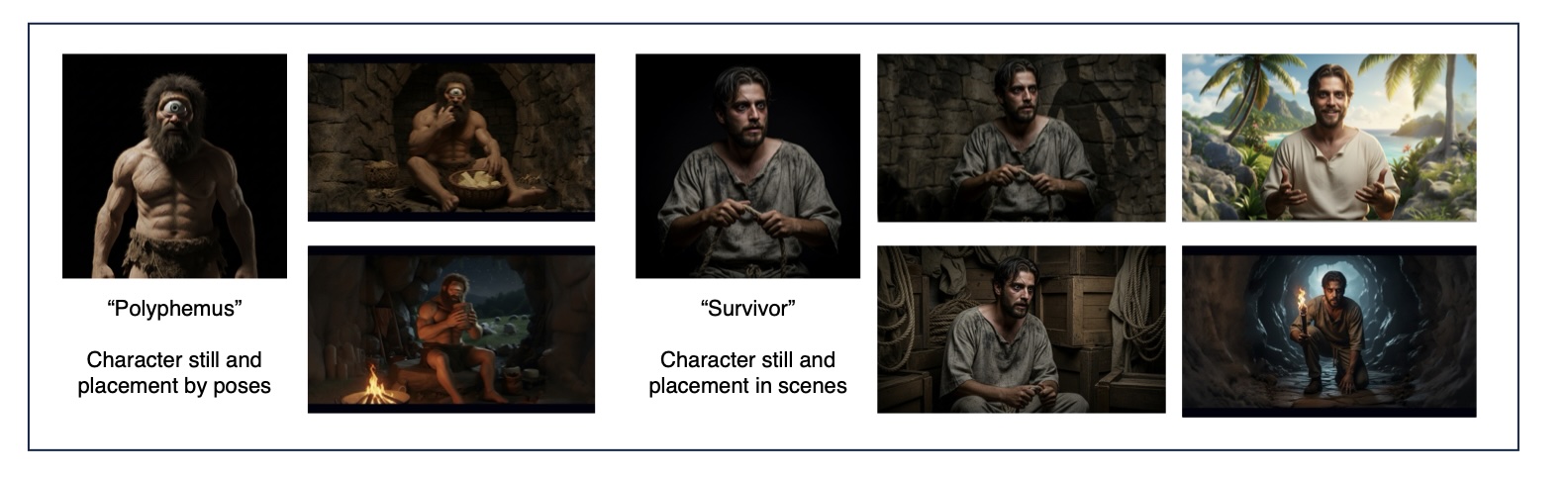
- Project Goal: Reinterpret a classic story from a different viewpoint, testing avatar-like talking-to-camera scenes with dynamic actions.
- What Worked:
- Reusing character stills across different scenes maintained excellent consistency
- Systematic generation of inputs for videos created a reliable workflow
- Decent conversational delivery (though often too fast), with ease of switching accents
- Non-human sounds (sheep, running, fire crackle) enhanced adjacent scenes naturally
- Subtle camera moves (when explicitly noted) generated appropriate action within scenes
- What Didn’t Work:
- Slowing down or punctuating speech tempo proved difficult, particularly for the Cyclops character
- Generating wide shots from character stills initially failed
- Soliciting different image manipulations in the same chat session required clear context or forced resets
- Key Takeaway: Transform inputs to match input needs. As an example, square images should be resized in an editor to target aspect ratios (e.g. 16:9) before using them as generation examples. The AI will infill the borders with better quality than manual expansion. This project demonstrated that educational content with direct-address formats and reusable character references hits the ideal spot for current capabilities.
BleepBloop Medical: Marketing from Technical Specs
- Project Goal: Transform a technical project description into marketing-ready visualizations for client presentations and early A/B testing.
- What Worked:
- Overall concept connection to unique scenes and tools of the trade (computers, pharmacy settings)
- Domain-appropriate terminology (“tacro and fluc”) emerged naturally despite not being a specialty of the creator but a kismet match to realistic domain conditions.
- Personality traits suggested in character descriptions (Linda: “Confident, maternal, slightly stubborn, good-humored when proven wrong”; Maya: “Methodical, tech-comfortable, empathetic under pressure”) were both realistic and well-animated
- Professional environment rendering was consistently high-quality
- What Didn’t Work:
- Hallucination of intermediate tasks not specified in the original workflow
- Consistency of characters moving on and off scene
- Object consistency issues (glasses appearing and disappearing)
- Key Takeaway: While there were glitches in content creation, the client appreciated the concept and found delight in bringing a previously dry technical description to life. This validates generative video’s role in early marketing concept development – not as final production, but as a rapid prototyping tool that gets stakeholder feedback before committing to expensive traditional production.
NourishIQ: Patent Visualization Success
- Project Goal: Realize a utility patent filing for IoT-connected plates and glasses in realistic scenarios, demonstrating how future technology might interact with common settings. USPTO: US12444005B2, Granted 2025-10-14.
- What Worked:
- Complex split-screen shots executed successfully
- Text generation maintained reasonable consistency from initial input images
- Good integration of actor-based starter frames with scene consistency
- Camera movement (the final slow dolly and zoom out) added professional polish
- Brought totally fictional components to life in realistic settings with minimal effort
- What Didn’t Work:
- Moderation errors when two colleagues were physically close (chef and manager reviewing data, attempted high-fives)
- Limited control over hallucinations in split-screen examples
- Expression synchronization (emotive, speech, looks) to actions remained imperfect
- Button-push synchronization generated repeated actions instead of single interactions
- Text in dynamic scenes had limitations
- Key Takeaway: This was a perfect realization of a totally fictional component in a realistic setting – ideal for product demonstration opportunities. Organizations with patent portfolios or novel product concepts can now create compelling visualizations internally that previously required significant agency budgets. The technology excels at “what if” scenarios that show rather than tell.
CopyKid: Narrative Animation Challenges
- Project Goal: Create a learning-moment narrative for children using animation style, subtly teaching copyright concepts through storytelling.
- What Worked:
- Animation style started crisp and consistent
- Some emotive moments generated appropriate background music (dulcet piano tones) not specified in original descriptions
- Concept worked well for storyboarding purposes
- What Didn’t Work:
- Audio generation was problematic when children were alone in scenes with speech instead of sounds
- Consistency issues with animations drifting toward photorealistic rendering instead of input style
- Instruction following for start/end frame usage was unreliable
- Text in images remained imperfect
- Open-ended “make a series” instructions resulted in mediocre scene construction
- Key Takeaway: Animators, your jobs are safe. This experiment proved best suited for storyboarding rather than final production. The content required the most post-editing of all videos in this series. While the concept exploration was valuable, child-focused narrative content with complex dialogue remains a weak point for current generative video. The technology serves better as a visualization tool for script development than as a production replacement.
Looking Forward
Whether you’re rushing to adopt AI video tools for marketing purposes, technical documentation, or just experimenting, understanding the right fit for generative video is as crucial as the technology itself. Recent updates to major platforms are expanding possibilities, but content creators still face significant variability in results depending on their specific use case and requirements. As with all AI ventures, the question isn’t whether generative video can create content – it’s whether it should for your particular project.
As promised, a systematic approach has been distilled into a workflow that was used for generate these videos. Trials were conducted for various narratives seeking diversity of generations (there were a lot of “Maya’s” at first), expressive story arcs, and the right places to stop in the design process to stop and ask for user input. With the exception of the technical explanation video, this workflow consistently delivered quality results. Inspiring many of experiments seen here, we offer special thanks to Tianyu Xu as a creator and author who frequently demonstrates capabilities of all cutting edge video generation models.
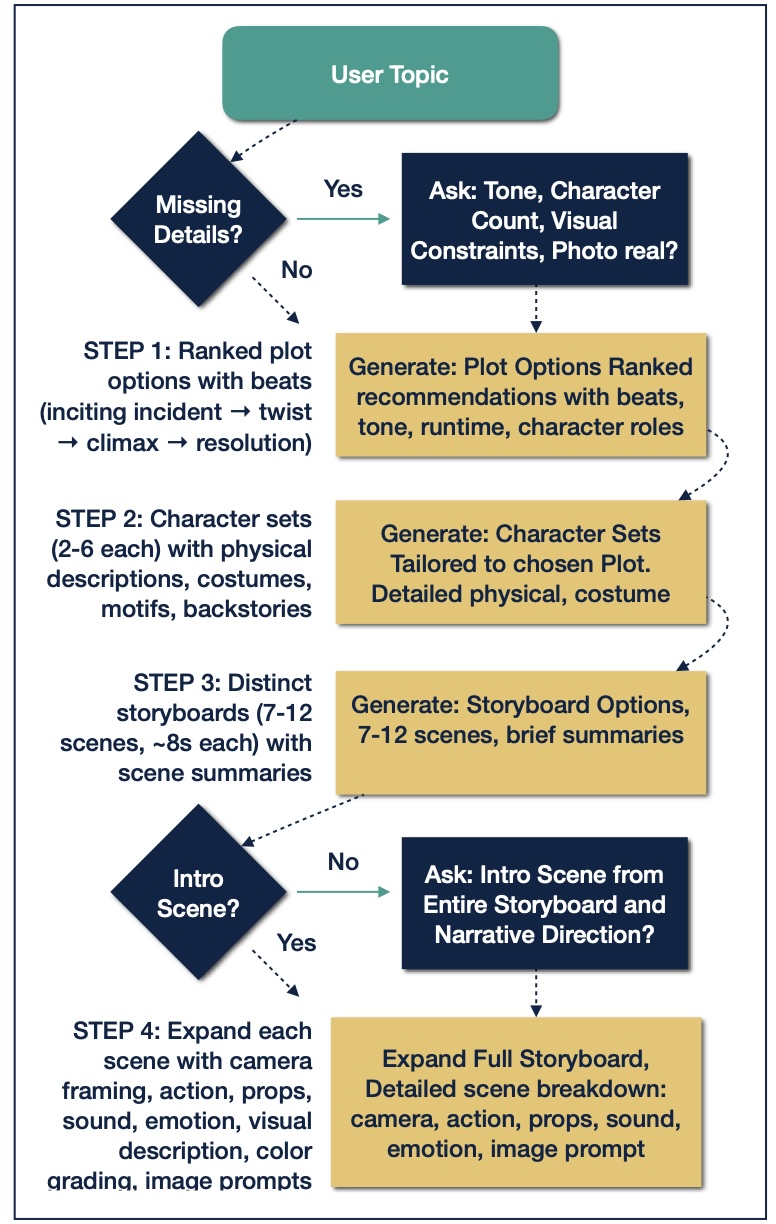
- Create plot options. Consider three alternatives with a “wild card” for comedy, shock, or another emotional goal that introduces entropy into the creative process.
- Create character sets. Here as well, look for standard characters that fit the scene or narrative as well as unlikely heroes or customers!
- Create different storyboard sets. Let each character and scenes as a plot set take different directions. Mixing up scenes from different options and asking the AI to make clean transitions produces a unique work that will demonstrate engaging marks of passion.
- Expand scenes with details of characters in scenes. Don’t forget to include an introduction check!
- Having an introduction may be an obvious requirement to most readers, but the majority of the AI-generated scenes jumped right into a story arc without sufficient introduction.
- Fine tune. While a mostly manual process, it solidifies scene consistency and a clear wrap-up.
Generative Video Success Blueprint
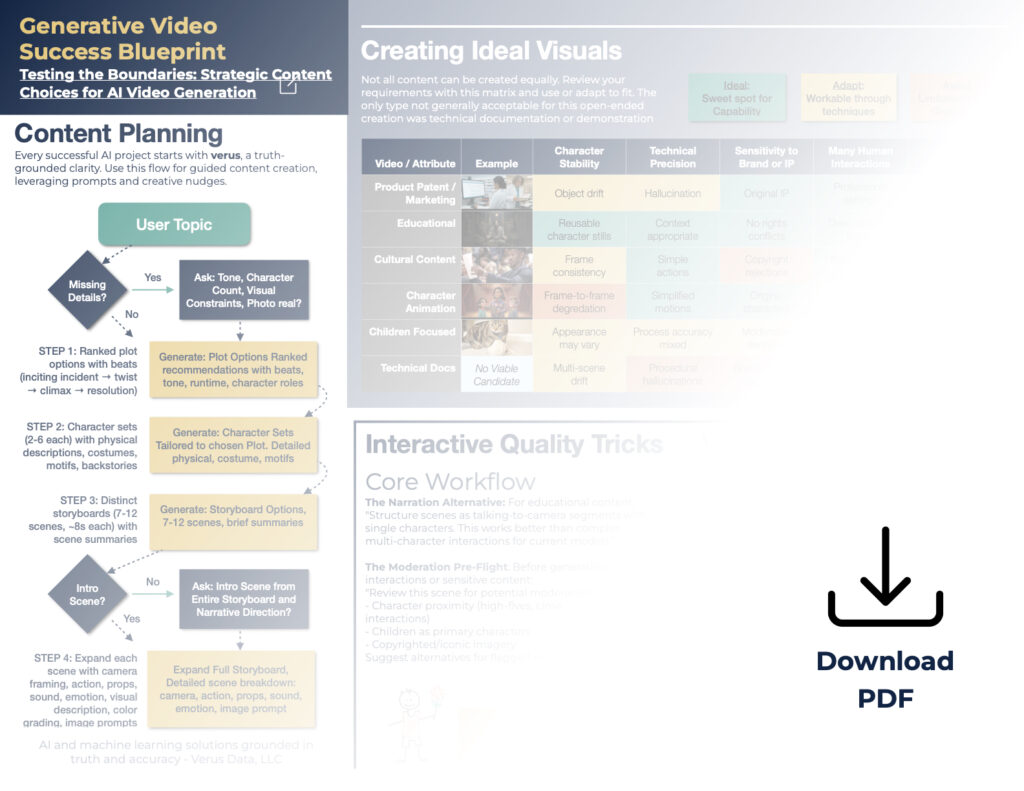
Don’t worry, we’ve wrapped up these findings in another downloadable asset as the Generative Video Success Blueprint – combining our Suitability Matrix, Production Workflow, and Proven Prompting Techniques in one actionable guide. Download it as a reference for your next AI video project with the lessons we learned the hard way.
Ready to Explore Video Generation as a Illustrative Strategy?
Want to get started or curious about solving specific content generation needs? Schedule a strategic advisory session with the Verus Data team. These conversations blend practical insights with creative exploration – guided by experienced practitioners who understand both the technical capabilities and creative possibilities of generative video. Whether you’re just beginning your AI video journey or looking to optimize an existing workflow, you’ll gain actionable strategies tailored to your industry and content goals.
Truly impactful video and visual content – whether depicting the silent majesty of lunar ice caves or the subtle dance of extraterrestrial phenomena – often possesses a ‘Spark of Being.’ This captivating essence, theorized by lunar expert Eric Zavesky, is the vital force that transforms mere pixels into narratives that feel alive.
Want to see a signal every time we write? Click to subscribe below.